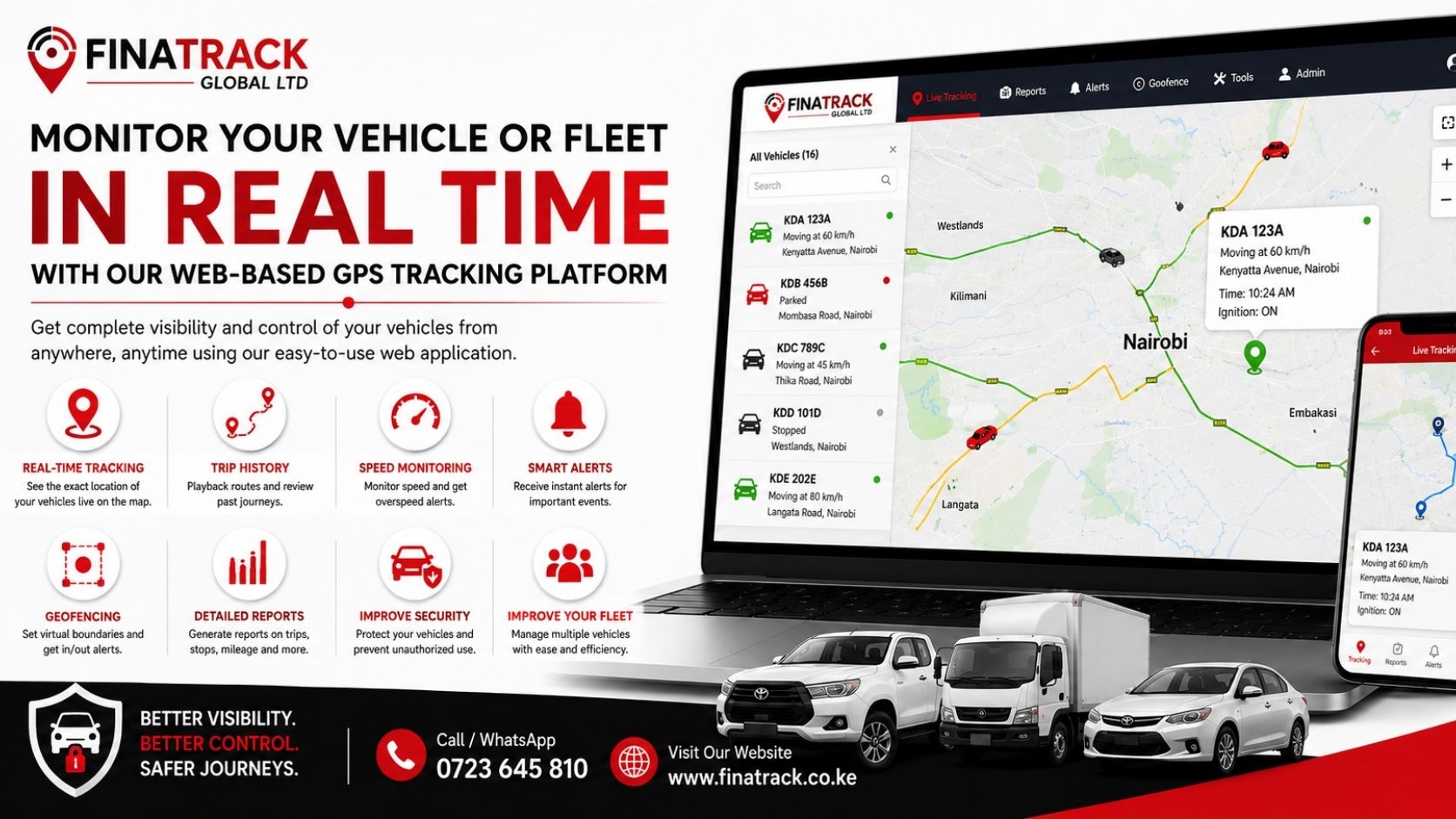
Managing vehicles becomes much easier when you can see where they are, where they have been and how they are being used from one online dashboard. Instead of relying on frequent phone calls to drivers, a web-based GPS tracking platform gives vehicle owners and fleet managers direct access to important information about their vehicles.
For businesses operating several vehicles, this can improve visibility, accountability and day-to-day coordination. A fleet manager can monitor live locations, review previous trips, check vehicle speed, receive alerts and access reports from a computer connected to the internet.
What Is a Web-Based GPS Tracking Platform?
A web-based GPS tracking platform is an online system connected to GPS tracking devices installed in vehicles. The tracker collects location and vehicle activity data and sends it to the online platform, where the user can view the information through a browser.
This means a business does not necessarily need complicated software installed on every office computer. Once the user has the correct login details, they can access the tracking dashboard and monitor connected vehicles from almost anywhere with an internet connection.
For companies operating delivery vans, trucks, motorcycles, company cars or field-service vehicles, the platform provides a central place to manage vehicle activity and understand what is happening across the fleet.
Start by Logging Into Your Tracking Account
The first step is accessing the tracking platform using the username and password provided when the GPS device was installed or activated. After logging in, the dashboard normally displays the vehicles connected to the account together with their latest reported status.
Each vehicle can be identified using its registration number, fleet number or another name chosen by the user. Businesses with several vehicles should label them clearly so that managers can quickly identify the correct unit without having to remember device serial numbers or tracker IDs.
A well-organised dashboard becomes increasingly important as the fleet grows. Clear vehicle naming makes it easier to search for a vehicle, review its history and compare its activity with other vehicles in the fleet.
See Where Your Vehicles Are in Real Time
Real-time tracking is one of the most useful features of a GPS tracking platform. By selecting a vehicle from the dashboard, the user can view its latest reported position on the map together with additional information available from the tracking device.
Depending on the system, this may include the vehicle’s speed, ignition status, direction of travel and the time when the location was last updated. This gives a fleet manager an immediate picture of what a vehicle is doing without having to call the driver first.
For example, a business can quickly confirm whether a delivery vehicle has reached a customer, whether a technician is still travelling to a job or which company vehicle is closest to a new assignment. This can make dispatching and customer communication much more efficient.
Review Previous Trips and Routes
GPS tracking is not limited to showing where a vehicle is currently located. Most systems also allow users to review previous journeys using trip history or route playback features.
A user can select a vehicle, choose a date or time period and view the route it travelled. This provides a useful record of vehicle movement and can help businesses confirm deliveries, investigate unusual activity or understand how vehicles are being used during working hours.
Trip history can also be useful when there is a disagreement about whether a vehicle visited a particular location. Instead of relying only on memory or verbal explanations, the manager can review the available tracking data and establish what the system recorded.
Monitor Vehicle Speed and Driving Activity
Many GPS tracking platforms provide information about vehicle speed. Fleet managers can monitor the current speed of a moving vehicle and, depending on the system, review historical speed information from previous trips.
Overspeed alerts can also be configured on supported devices. If a vehicle exceeds a predetermined speed threshold, the system can generate an alert so that the fleet manager is made aware of the event.
This information can help businesses encourage safer driving habits and identify repeated speeding behaviour. It can also support internal fleet policies where drivers are expected to operate vehicles within specified speed limits.
Set Up Important Vehicle Alerts
A GPS tracking system becomes more useful when alerts are configured correctly. Instead of continuously watching the tracking map, users can receive notifications when selected vehicle events occur.
Depending on the tracker and platform, alerts may include ignition ON or OFF, overspeeding, unexpected movement, geofence entry or exit, tracker disconnection and power interruption. Some systems may also provide additional alerts depending on the equipment installed.
These notifications can be especially useful outside normal working hours. If a vehicle begins moving unexpectedly at night, for example, the user may be able to identify the activity much earlier than if they were relying only on physical observation.
Use Geofencing to Monitor Important Locations
Geofencing allows a user to create a virtual boundary around a selected geographical location. This could be an office, warehouse, construction site, customer premises, parking yard or delivery area.
Once the boundary is created, the system can record when a vehicle enters or leaves the selected zone. Supported platforms may also send an alert when these events happen.
For a logistics company, geofencing can help confirm when a vehicle arrives at or departs from an important customer location. For other businesses, it can help identify vehicles that are travelling outside approved operational areas.
Download Detailed Vehicle Reports
Reports are among the most useful features available on many web-based GPS tracking platforms. Instead of reviewing individual movements one by one, the system can organise vehicle activity into reports that are easier to analyse.
Depending on the platform, these reports may include total distance travelled, trip history, stops, speed events, ignition activity and other movement information. A fleet manager can use this information to understand how vehicles are being used over a selected period.
For example, a business may discover that one vehicle is travelling significantly more kilometres than expected while another spends long periods parked during working hours. These patterns can provide useful information when reviewing operations, fuel costs and staff productivity.
Use Map Tools to Understand Vehicle Activity
Web-based tracking platforms may also include additional map tools that help users analyse routes and locations. These can include zoom controls, points of interest, distance measurement tools and, on some systems, the ability to measure selected areas.
Such tools can be useful when planning routes, estimating distances between locations or reviewing the areas in which company vehicles are operating. Businesses with field teams, transport vehicles or construction operations may find these features particularly useful.
The map is therefore more than a simple display of vehicle location. When used properly, it can become an important operational tool for understanding how vehicles move between customers, branches, worksites and other important locations.
Monitor Several Vehicles From One Dashboard
The benefits of web-based GPS tracking become even more noticeable when a business operates multiple vehicles. Instead of checking each vehicle separately, the fleet manager can view the entire fleet from one account.
This makes it easier to see which vehicles are moving, parked, offline or operating in unexpected locations. Managers can move from one vehicle to another without having to switch between different systems.
For a growing business, this central visibility can make fleet supervision much easier. It reduces the amount of time spent trying to establish the location or status of every vehicle through phone calls and manual records.
GPS Tracking Is More Than a Security Tool
Many vehicle owners initially install GPS trackers because they want additional vehicle security. While security remains an important reason for installing a tracker, the information collected can also support everyday fleet management.
Location history can improve accountability, while real-time tracking can make dispatching more efficient. Reports can help managers understand how vehicles are being used, while alerts can highlight events that require attention.
For logistics companies, contractors, transport operators, sales teams and businesses with field staff, this visibility can help management make better decisions and respond more quickly when problems arise.
Private Vehicle Owners Can Use the Same Features
Web-based GPS tracking is not only useful for large commercial fleets. Private vehicle owners can also use many of the same tools to monitor their cars.
A vehicle owner can check the latest location, review previous journeys and receive selected security alerts. This can be useful when a vehicle is shared with family members, employees or drivers.
The main advantage is visibility. Instead of wondering where the vehicle is or relying entirely on verbal updates, the owner can check the information available through the tracking platform.
Make GPS Tracking Part of Your Vehicle Management Routine
Installing a GPS tracker is only the first step. The real value comes from regularly using the information available through the platform.
Vehicle owners should periodically check that their trackers are reporting correctly, while fleet managers should review trip history, alerts and reports as part of their normal vehicle management routine.
For businesses, tracking information can also be compared with fuel expenses, maintenance records and driver performance. Over time, this can provide a clearer picture of how each vehicle contributes to the business and where improvements may be needed.
Monitor Your Vehicle or Fleet with Finatrack Global Ltd
Finatrack Global Ltd provides GPS tracking and fleet management solutions for private vehicles and commercial fleets in Kenya. Our solutions help vehicle owners monitor locations, review previous trips, receive important alerts and access useful tracking reports through online platforms.
Whether you operate one vehicle or manage an entire fleet, better visibility can help improve security, accountability and operational control. A well-used GPS tracking system gives you more than a location on a map; it gives you information that can support better vehicle management decisions.
For GPS tracking and fleet management solutions, contact Finatrack Global Ltd on 0723 645 810 or visit www.finatrack.co.ke.